Building COVID-19 digital services
Turning confusion into action for millions of people by creating 2 clear and easy-to-use services during critical moments in the pandemic.
One is to find a nearby testing location and the other is to help get a proof of vaccine certificate.
Role
Lead content designer, co-UX designer
Organization
Ontario Digital Service
Client
Ministry of Health
Service 1: testing locations
The government needed to tell citizens where they could find a testing location.
It had to be fast, scalable, and for every region in the province.
Challenge
Approach
To build a page with a search that contained every testing location in the province, doing rapid user testing and adhering to the style guide and design system.
User story
I drafted the user story to narrow our focus and describe the core user need:
As a
person in Ontario who is feeling COVID-19 symptoms
I want
to find the nearest testing location and understand what services are offered
So that
I can get tested for COVID-19 quickly and conveniently
User research and prototyping phases
Being brought in from the beginning, I:
added content design-specific items to the research plan (for example, how users actually speak about their symptoms) and ran highlighter testing
researched other jurisdictions, similar services, and best practices for communicating in a health-care context
watched and took notes during user interviews and usability tests, translating the qualitative data into prototype changes in Figma
Building and live phases
During and after the initial build, I:
used analytics data, user feedback, and direction from the ministry to iterate and make it easier to find and interact with the page
adhered to content design best practices (active and plain language, hierarchy of information) and the design system
Outcome and rationale
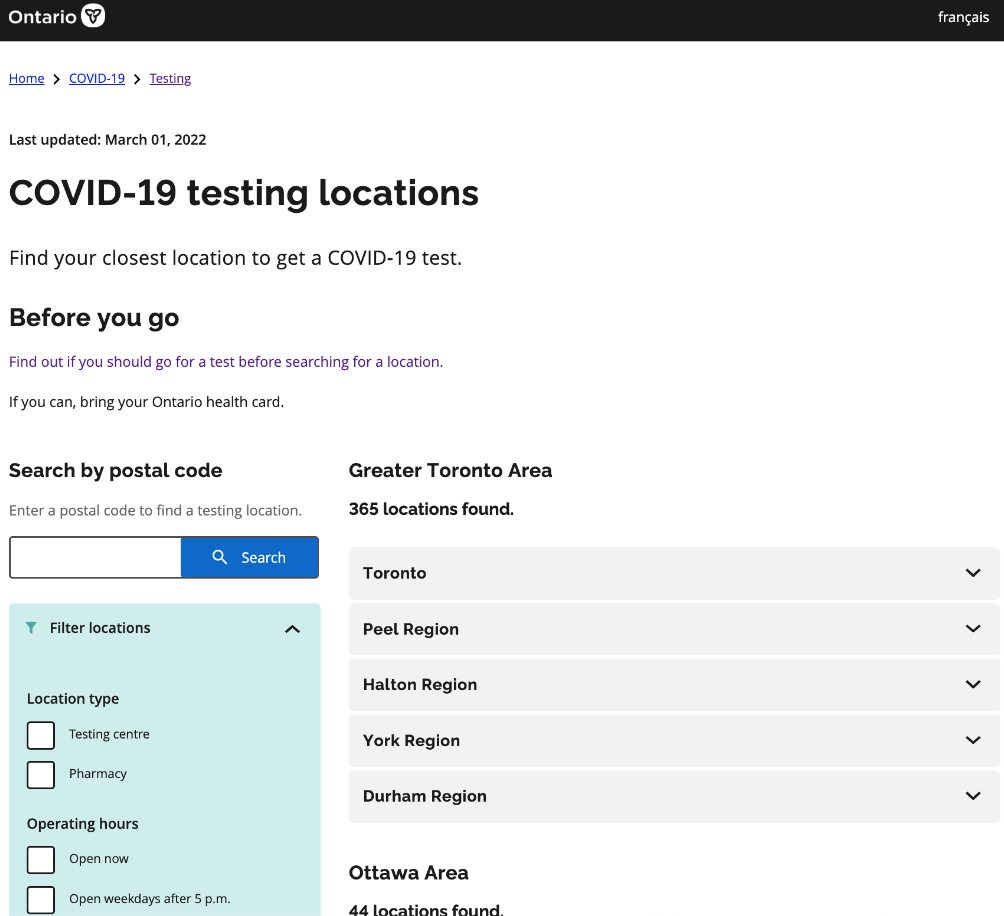
A page with all testing locations that a user could search by postal code to find one near them.
Every design decision and improvement traces back to a specific user need or pain point.
I used Google Trends and user interview data to learn which keywords people were searching with.
This improved how easily the page could be found. I made sure to use them in the title and lead to improve Search Engine Optimization (SEO).
Linked out to eligibility information to cut down on the length of the page and avoided maintaining the same content in 2 places.
Placed the entire sentence in the link for better accessibility. Also, a button would have been too prominent and competed with the "Search" call to action.
Instead of alphabetical order, l listed regions from highest population to lowest because most of our visits were from these areas.
This gave the majority of people an opportunity to quickly find a testing location without long scrolling.
Filters included what users wanted to know and were ordered from most important to least (based on user testing).
The back-end data was constantly updated by my team, which required collaboration with other government divisions and the testing locations.
Information users wanted to know during testing so they could easily and quickly make decisions about going to this location.
This reduced phone calls to the testing locations for information that wasn't related to making an appointment.
We could not build a map because of time and technology constraints. I opted to include this "Open in Google Maps" link as a short-term workaround.
The map feature was put into the backlog for a future iteration (as it was a user expectation).
Impact
The page reduced non-appointment-related calls to testing sites by an estimated 60% by surfacing hours, parking, transit access, and requirements.
This freed up time for resources at the sites to focus on the in-person (and most critical) aspects of the service.
Consolidated 365 locations across the province into a single searchable service.
This took away the need for every region to maintain their own pages and to have the information consistently structured (especially because we had done user testing).
Having a postal code search and priority-ordered filters reduced the average time that a user found a location to about 30 seconds.
This allowed users to get their goal done quickly and cut down on cognitive load.
Service 2: proof of vaccine certificate
The government needed to direct people to where they could get their certificate after being vaccinated (to show as proof).
It could vary depending on the person’s dose count, where they were vaccinated, and what type of health card they had.
Challenge
Approach
To build a page where people answer a few questions that would point them in the right direction while adhering to the style guide and design system.
User story
I drafted the user story to narrow our focus and describe the core user need:
As a
person who got their COVID-19 vaccine
I want
to easily find where I can get a copy of my certificate
So that
I can show it as proof that I'm vaccinated
My work
During the rapid research, build, and testing phases, I:
wrote the questions and results in plain language, paying extra attention to the cognitive load of long questions
used inclusive language and surfaced helpful information at the time users needed it
iterated on the questions and logic based on user feedback and direction from the ministry
ticketed out changes in Jira to:
make the input process smoother for the developer
help myself and the product manager keep track of tasks
Outcome and rationale
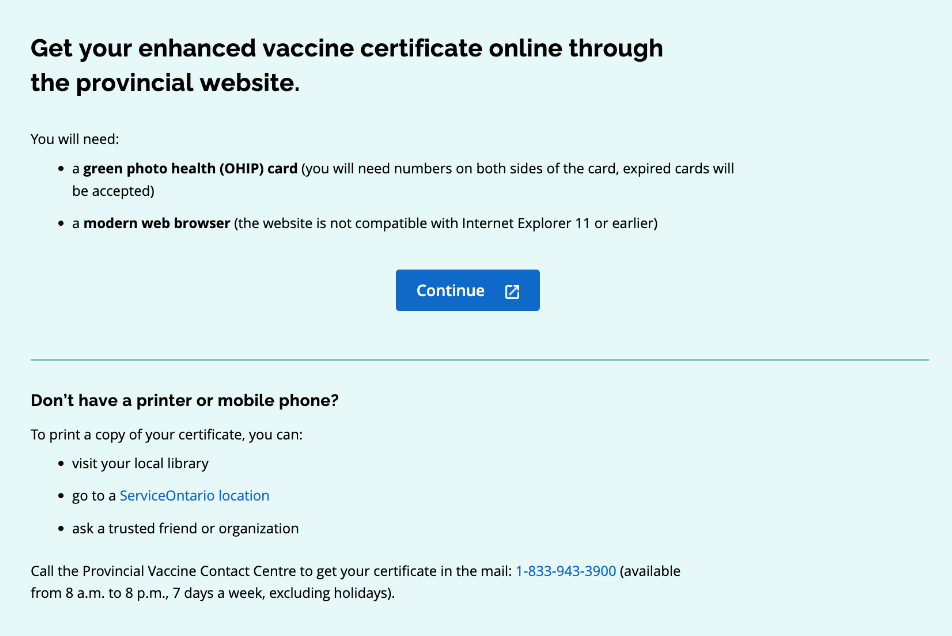
A page with a guided set of questions that pointed the user to exactly where they could get their vaccine certificate.
The branching logic ensured the user would get information only relating to their specific needs.
I used Google Trends data, user research, and user interviews to learn which keywords people are searching with to make this page more discoverable.
I put them in the title and lead to improve Search Engine Optimization (SEO).
Included the colours of the health cards because that is how people in user research spoke about them (important to use language that they expect).
Proactively put "expired cards accepted" as this was an anticipated pain point (because many cards had expired over the pandemic).
Provided information and requirements that people would need to know before continuing.
I wanted to prepare them for the next step in the process to reduce frustration.
Suggested alternative ways to get their certificate as not everyone has a printer or phone. It's a small but inclusive addition.
Mapped the full branching logic in Miro to think through every path before (and after) the build.
We had to coordinate with our ministry partners to confirm the right routing multiple times after launch as new policies were introduced.
Impact
The page reduced the number of calls to the contact centre by an estimated 25-30% and got users to their correct destination in under a minute.
The branching logic and clear call to actions allowed users to feel confident to move ahead without phoning to double check, freeing up resources at the call centre.